

This article is no longer updated.
Please go to our new Intercom knowledge base to ensure you're seeing the most recent version.
The link above takes you directly to the equivalent article on Intercom.
You can print three different lists from the scripts menu in the Excursions File.
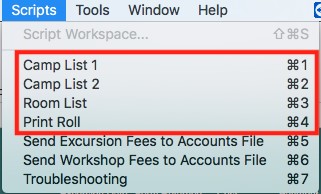
‘Camp List 1’ includes student name, form, dietary and medical requirements, form return status and other notes.
‘Camp List 2’ includes student name and year level.
‘Room List’ includes student name, year level and room number.
‘Print Roll’ includes Supervising Staff and Date at the top as well as student name, date of birth, parent names and 10 blank columns (headings can be customised).
Each of these scripts runs through the same steps. First, a find request is created. For all scripts, an excursion name should be entered in the ‘Excursion’ field before continuing. Additional criteria can be added if necessary. For ‘Print Roll’ a dialogue box will then open in which headings and key can be edited.
Finally, the finished report will be opened in preview mode.