

From Music Monitor V9.071 the Debtor Report script can generate a report as of the current date or for any past date. For more information see Debtor Report.
Past Versions
For Music Monitor V9.070 and earlier, use the instructions below.
An ‘Aged Debtor Report’ is a Debtor Report produced retrospectively for a past point in time.
To produce an Aged Debtor Report, go to Common Tasks > Financial Reports > Debtor Report (or run the debtor report in an alternative manner.
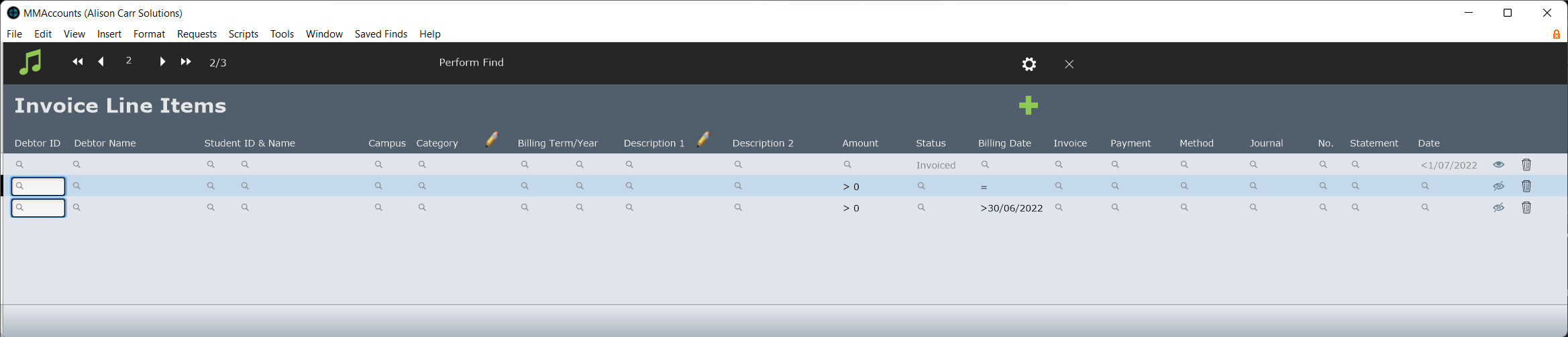
When the script pauses in Find Mode, modify the find in the following ways:
In the first request:
Remove ‘Invoiced’ from Status.
Add ‘<’ and a date* in Date Created.
In the second request:
Set the request to Omit.
Change ‘<0’ to ‘>0’ in Amount.
Remove ‘=’ from Invoice Ref.
Add ‘=’ to Billing Date.
In the third request:
Set the request to Omit.
Remove 'Refund' from Category.
Add ‘>0’ in Amount.
Add ‘>’ and a date** in Billing Date.
*The past date you would like the report to retrospectively be generated for.
**The date before the past date you would like the report to retrospectively be generated for.
The requests should look like this:
When the script is continued, it will generate a Debtor Report as though it was the past date.